
Mazda Drivers Garage – The All-In-One Mazda Ownership Tracker
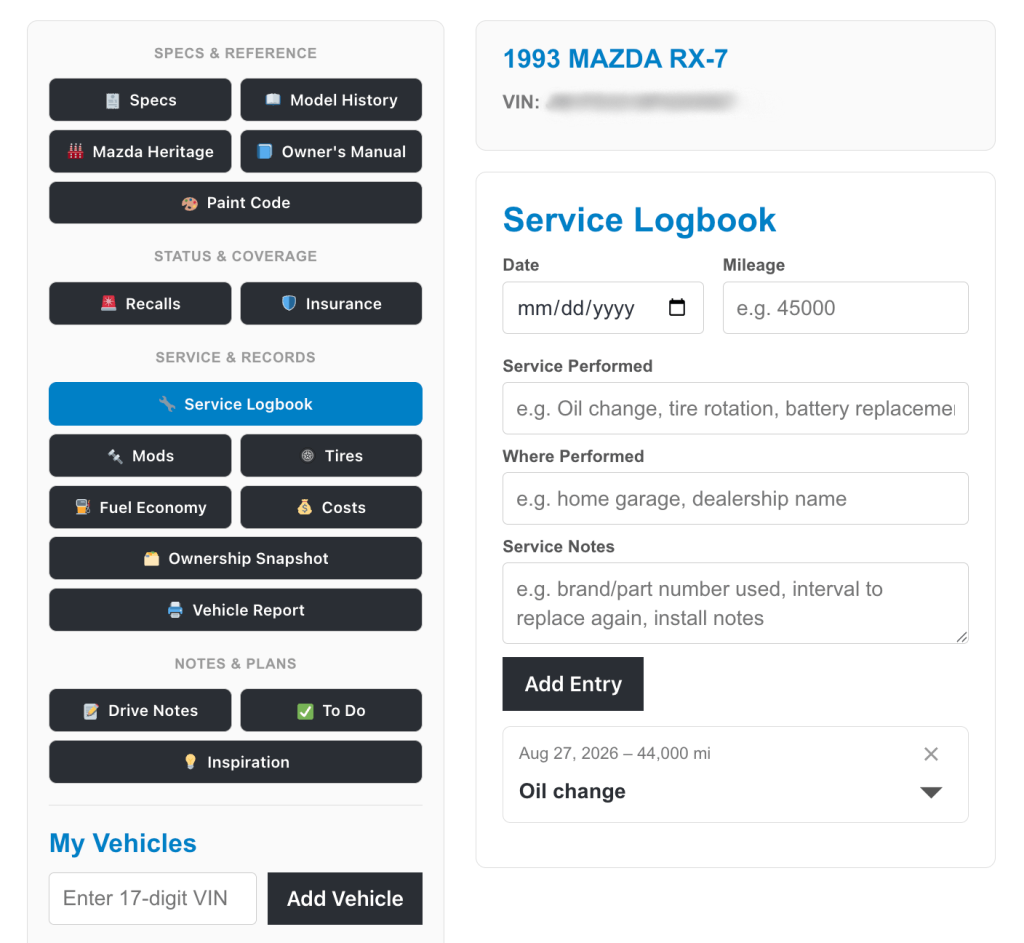
Looking for one place to track your Mazda’s maintenance, mods, MPG, and more? Mazda Drivers Garage is a free, all-in-one Mazda ownership tracker: a Mazda service logbook, a fuel economy log, and resource for recalls, costs, specs, paint codes, and insurance – all in one place. Keep an ownership snapshot on file and a running to-do list for your Mazda3, CX-5, MX-5 Miata, RX-7, or any other Mazda in your home garage.
Create an Account
Create a free account to save and track your Mazda's service history, recalls, mods, and more.
Your Online Mazda Service Logbook and Much More: Features of Mazda Drivers Garage
1. Decode Your Mazda VIN and Find Its Specs
A Mazda’s 17-digit VIN encodes real information about the vehicle, but decoding it by hand means working through confusing character charts most owners never bother with. Mazda Drivers Garage handles it automatically: enter a VIN once, and it pulls engine, transmission, drivetrain, and body style from official vehicle data.
This makes it possible to find Mazda specs from a VIN without guesswork, confirm what engine came in a specific trim, or keep a full spec sheet on file. It also provides a fast way to decode a Mazda VIN before a repair, a parts order, or a sale, with no separate VIN-lookup site required, since the result stays tied to the rest of the vehicle’s records.
2. Check Your Mazda for Open Recalls by VIN
Mazda Drivers Garage checks live, official NHTSA recall data every time the page loads, rather than relying on a one-time lookup or a list that’s gone stale. A routine Mazda recall check by VIN returns open campaigns, the affected component, and a plain-language summary of what each recall actually covers. Recall data covers US-market vehicles only.
Recalls can be issued well after a car is sold, sometimes years later, and a clean check today doesn’t guarantee anything a year from now. So, it’s worth building into regular ownership checks rather than treating as a single, one-time task.
3. Find Your Mazda Paint Code by Color
Locating a Mazda’s factory paint code usually means squinting at a door-jamb sticker in poor lighting or guessing at a shade of red online. Mazda Drivers Garage includes a built-in Mazda paint code lookup: select a color, get the official factory code, and save it to the vehicle’s record.
This is especially useful for colors that changed codes over the years. The different versions of Soul Red are a good example, since Mazda updated both the formula and the code more than once since its introduction. Rather than trying to remember which version applies to which model year, the correct code stays on file, ready for the next touch-up order or body shop quote.
4. Track Your Mazda’s Fuel Economy / MPG
Manufacturer fuel economy estimates are a starting point, not a real answer. Actual mileage depends on driving style, terrain, and how well the car is running. Mazda Drivers Garage’s fuel log tracks every fill-up and calculates real MPG automatically between full tanks, producing an ongoing, honest figure instead of a one-time sticker number.
This functions as a complete Mazda fuel economy log: gallons, cost, and whether a fill was full or partial, with the math handled automatically. For owners currently using a general-purpose app like Fuelly to track gas mileage separately, this folds that same tracking into the same account as service records and mods, removing the need for a separate login just for fuel.
5. Keep a Complete Mazda Service Logbook
A box of old receipts only works until someone needs to remember exactly when a service happened, or hand a car off to a new owner with a real record to show for years of upkeep. Mazda Drivers Garage’s Service Logbook keeps a permanent, dated Mazda maintenance log: what was done, when, at what mileage, and where.
This builds into a complete Mazda repair history over time, available whenever it’s needed, whether that’s confirming the date of the last tire rotation or reviewing full service records before a sale. It answers the one question that matters most in that moment: whether there’s an actual record to back up a car’s upkeep.
6. Log Your Mazda’s Mods and Upgrades
Keeping track of exactly what’s been installed on your car gets harder after a few years of upgrades, wheels, suspension setups, and an exhaust that was added at some point along the way. Mazda Drivers Garage’s mod log keeps a running record of every modification, tagged by category and date, from wheels and suspension to exhaust, intake, and lighting.
This functions as a lightweight Mazda build log without requiring a forum thread to stay organized. Tracking Mazda modifications this way is useful both for personal reference and for anyone considering buying the car later, since a documented modification history is far more convincing than a verbal account.
7. Track Your Mazda’s Tire Size and Info
What tire size does my Mazda need? Or, how can I track my Mazda tire size and rotations over time? Confirming an exact tire size while standing in a tire shop is a common, avoidable inconvenience. Mazda Drivers Garage stores the current front and rear tire size alongside the rest of a vehicle’s records, along with notes on brand, PSI preference, or the last rotation date.
It’s a small detail, but a useful one to have on hand the next time a quick answer is needed without searching a glovebox or reading a sidewall in poor light.
8. Track Your Mazda Ownership and Repair Costs
The real cost of owning a Mazda varies by owner and is nearly impossible to know without tracking it directly. Mazda Drivers Garage’s cost log makes it easy to record every repair, part, and service expense as it happens and keep a running total automatically, functioning as a genuine Mazda ownership cost tracker rather than an estimate.
The total cost of maintenance, repairs, and upgrades is useful for personal budgeting and serves as a reasonable talking point in a sale without disclosing any individual repair costs.
9. Track Your Mazda Insurance Cost and Policy
How much is my Mazda’s insurance costing me? Insurance rates and providers change over time, and it’s easy to lose track of exactly what’s being paid and why. Mazda Drivers Garage helps you log your Mazda insurance policy, recording the provider, policy number, payment frequency, and premium each time coverage changes, building a running history rather than a single snapshot that goes stale.
That history is useful beyond day-to-day reference: tracking your Mazda insurance cost over time, provider by provider, makes it easier to evaluate whether it’s time to get new quotes and possibly switch to a different auto insurance company.
10. Find Your Mazda Owner’s Manual by Year and Model
A general search for a Mazda owner’s manual often turns up outdated PDFs, third-party reseller sites, or manuals for the wrong model year. Mazda Drivers Garage provides a direct link to Mazda’s official manuals and guides page, along with a link to Mazda’s official warranty information, so the correct manual can be selected by year and model in one step.
This removes the guesswork of determining which owner’s manual applies to a given car, particularly for models that changed mid-generation or share a name across very different years.
11. Learn About Your Mazda Model’s History
Mazda’s most established models have gone through multiple distinct generations, each with its own character and reputation. The difference between an NC and an ND Miata, for example, or the history behind the RX-7, is often more relevant to an owner than a general overview of the nameplate as a whole. Mazda Drivers Garage pulls model history matched to the specific generation where possible, rather than defaulting to a single, undifferentiated summary.
This turns a quick lookup into a more precise answer, tied to the actual vehicle on file rather than a broad search for the model name alone.
12. Save Mazda Mod Ideas on Your Inspiration Board
Not every upgrade idea is ready to act on immediately, but good ideas are easy to lose track of. The Inspiration tab functions as a Mazda build inspiration board: links from Instagram, Pinterest, Amazon, tuner shops, or forum threads, all saved and tied to a specific vehicle.
This makes it possible to save Mazda upgrade ideas as they’re found, rather than losing a bookmark in a closed browser tab or forgetting where a particular wheel setup was originally spotted. When the time comes to commit to a mod, the research is already organized in one place.
13. Keep a Mazda Maintenance To-Do List
Not every task gets done the moment it’s identified. The To-Do tab keeps a running list of repairs, purchases, and upgrades that are planned but not yet complete, with an optional target date or mileage attached.
Marking a task as done will remove it from the list, so remember to log the completed work in the Service Logbook, Mods, or Costs tab beforehand if a permanent record is wanted.
14. Maintain a Mazda Ownership Record on File
Current mileage, length of ownership, title status, and general condition are details worth having on file regardless of whether a sale is being considered. Mazda Drivers Garage’s Ownership Snapshot maintains a single, current record that gets updated as details change, rather than a growing list to search through.
The result is a car whose details are actually known and documented, useful for personal reference, for a mechanic, or eventually, for a buyer. Maintain your vehicle’s ownership record online with Mazda Drivers Garage, from MazdaMotoring.
15. Generate a Printable Vehicle Report for Your Mazda
The Mazda Drivers Garage’s Vehicle Report compiles logged service history and modifications into a single, printable timeline, generated on demand rather than assembled from memory shortly before a sale.
The result is suitable to hand to a buyer or your mechanic, including a full history timeline during your ownership, along with live recall status checked at the moment the report is generated.